

TTB White LOGO TB
  • News
  • PC & Hardware
  • Mobiles
  • Gaming
  • Electronics
  • Gadget
  • Reviews
  • How To
  • Login
  • Sign Up
Trending
Starzspins Deutschland: Eine umfassende Übersicht über neue Spiele und ihre Features
Cazeus Casino Chile: guía completa para comenzar a jugar en 2026
Glorion Casino België: ontdek de spannende wereld van live casino spellen
Discover the advantages of using the FunPari O’zbekiston mobile app for instant access to
Rainbet Casino France : débloquez des bonus incroyables en 2026
Monday, Aug 10, 2026
The Tech BasicThe Tech Basic
Font ResizerAa
Search
  • News
  • PC & Hardware
  • Mobiles
  • Gaming
  • Electronics
  • Gadget
  • Reviews
  • How To
Follow US
Apple Music
The Tech Basic > News > Apple Music Secret: See Translations and Pronunciation Instantly
News

Apple Music Secret: See Translations and Pronunciation Instantly

Salman Akhtar
Last updated: 29 January 2026 15:34
Salman Akhtar
Share
Image Source: 9to5Mac
SHARE

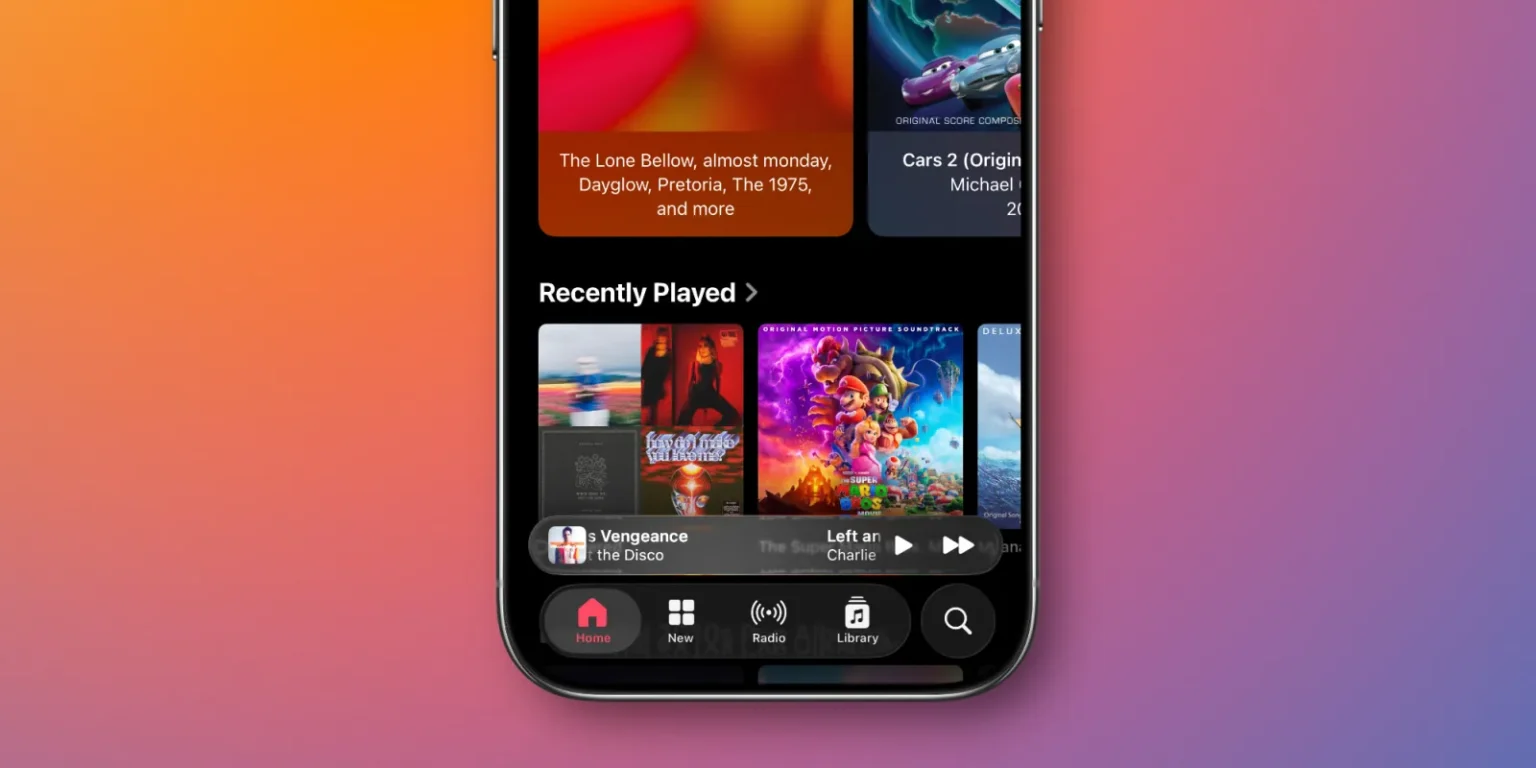
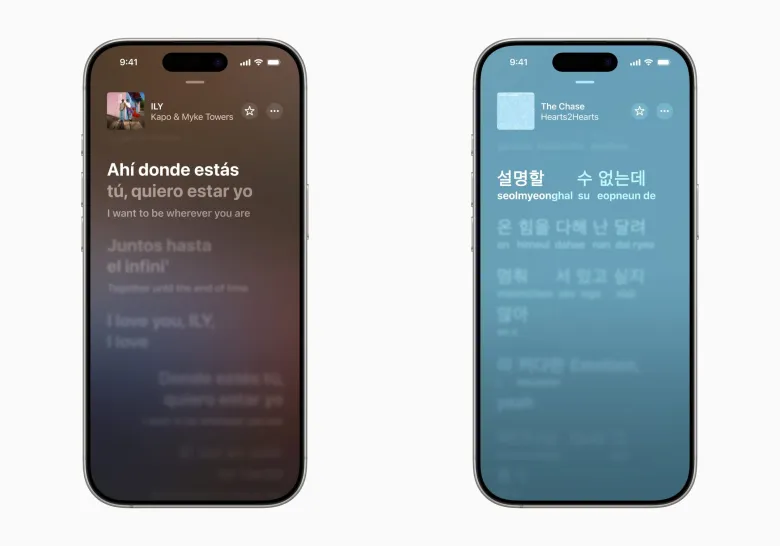
Apple Music has introduced lyric translations and phonetic speaking so that listeners can follow the songs in foreign languages. This element makes the process of learning what a song means and singing it in the correct pronunciation easier. The tools work well for many popular songs, and they are simple to use on a modern iPhone or iPad.
Contents
  • Open Apple Music App
  • Show Lyric Translations
    • How the Features Behave
    • What Devices Support This
    • Simple Steps to Follow
    • Extra Tips for a Smoother Experience
Apple Music
Image Source: Music Ally

Open Apple Music App

Listen to Apple Music on your iPhone or iPad. Play the song you want to see. Tap the playback area to view the player controls. Tap the small quote mark icon near the controls to open the lyric view. In many tracks, you will see time-synced lyrics that move with the music.

Show Lyric Translations

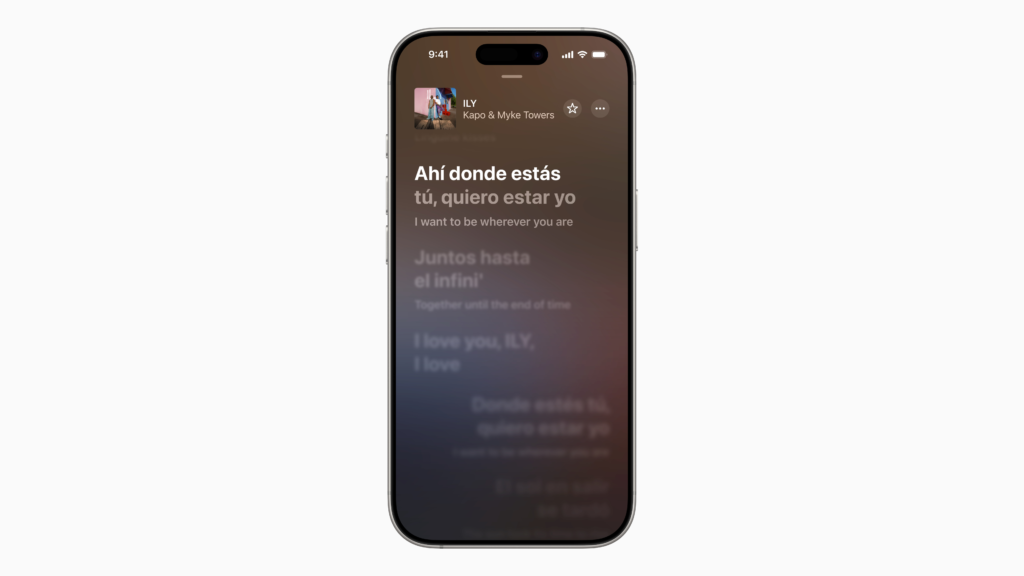
When the lyric view is open, look for the translation option. Tap the translation control to show a line-by-line translation in your device language. The translations follow the synced lyrics, so you can read the translation as the song plays. The same lyric panel also shows pronunciation guides when they are available.

How the Features Behave

Translations appear line by line alongside the synced lyrics. Pronunciation displays as a phonetic guide under the lyric lines when Apple has provided one. These options are controlled by the lyric panel in the player. Changes to your device preferred language can affect which translation appears. Not every song has a translation or a pronunciation guide. Songs from major labels and new releases are most likely to have full support.

What Devices Support This

The tools were introduced with Apple Music updates on recent iPhone and iPad software versions. Many users will see the new options on recent iPhone and iPad models. Support and rollout may vary by region and by song. The library of translated tracks will expand over time.

Simple Steps to Follow

Open Apple Music on an iPhone or iPad. Play the track you want to read. Tap the quote icon to open the lyrics. Use the translation control to switch to translated lines. Use the pronunciation display to see phonetic guides for each line when available. Tap Close when you are done.
Apple Music
Image Source: TechCrunch

Extra Tips for a Smoother Experience

Always update Apple Music and iOS, and watch new features of lyricisms appear. Use well-lit and quiet listening settings when you want to read and sing at the same time. Try songs that are popular or recently released for the best chance at full translations and pronunciation guides. Check your preferred language settings in the device settings to choose which language translations appear in.

TAGGED:Apple
Share This Article
Facebook Reddit Copy Link Print
Share
Salman Akhtar
By Salman Akhtar
View enlightening tech pieces written by Salman Keep up with the most recent news, advice, and trends in the field of technology.

Let's Connect

FacebookLike
XFollow
PinterestPin
InstagramFollow
Google NewsFollow
FlipboardFollow

Popular Posts

Starzspins Deutschland: Eine umfassende Übersicht über neue Spiele und ihre Features

The Tech Basic

Cazeus Casino Chile: guía completa para comenzar a jugar en 2026

The Tech Basic

Glorion Casino België: ontdek de spannende wereld van live casino spellen

The Tech Basic

Discover the advantages of using the FunPari O’zbekiston mobile app for instant access to

The Tech Basic

You Might Also Like

iOS 26
How To

How iOS 26 Prioritizes Alerts With Apple Intelligence

Mobile Game Installs
News

Mobile Game Installs Drop but Spending Climbs in 2025

Galaxy S26
News

Samsung Reinvents AI on Galaxy S26 With Triple Assistants

Apple
News

Apple Hits New Sales Peak in Europe While Demand Softens Elsewhere

Social Networks

Facebook-f Twitter Instagram Pinterest Rss

Company

  • About Us
  • Our Team
  • Contact Us

Policies

  • Disclaimer
  • Privacy Policy
  • Cookies Policy
Latest
Microsoft Launches Copilot Tasks Research Preview
Lenovo Teases Foldable Legion Go With 11.6 Inch Screen
Instagram Will Tell Parents When a Teen Searches for Suicide or Self Harm
Nvidia posts $68.1B quarter as AI boom accelerates Q4 growth
Gemini Automation Books Rides on Galaxy S26 and Pixel 10

© 2024 The Tech Basic INC. 700 – 2 Park Avenue New York, NY.

TTB White LOGO TB
Follow US
Welcome Back!

Sign in to your account

Username or Email Address
Password

Lost your password?

Not a member? Sign Up





