

TTB White LOGO TB
  • News
  • PC & Hardware
  • Mobiles
  • Gaming
  • Electronics
  • Gadget
  • Reviews
  • How To
  • Login
  • Sign Up
Trending
Starzspins Deutschland: Eine umfassende Übersicht über neue Spiele und ihre Features
Cazeus Casino Chile: guía completa para comenzar a jugar en 2026
Glorion Casino België: ontdek de spannende wereld van live casino spellen
Discover the advantages of using the FunPari O’zbekiston mobile app for instant access to
Rainbet Casino France : débloquez des bonus incroyables en 2026
Monday, Aug 10, 2026
The Tech BasicThe Tech Basic
Font ResizerAa
Search
  • News
  • PC & Hardware
  • Mobiles
  • Gaming
  • Electronics
  • Gadget
  • Reviews
  • How To
Follow US
Gemini
The Tech Basic > News > New Gmail Tool Uses Gemini to Plan Meetings in Seconds
News

New Gmail Tool Uses Gemini to Plan Meetings in Seconds

Salman Akhtar
Last updated: 15 October 2025 18:10
Salman Akhtar
Share
Image Source: Zapier
SHARE

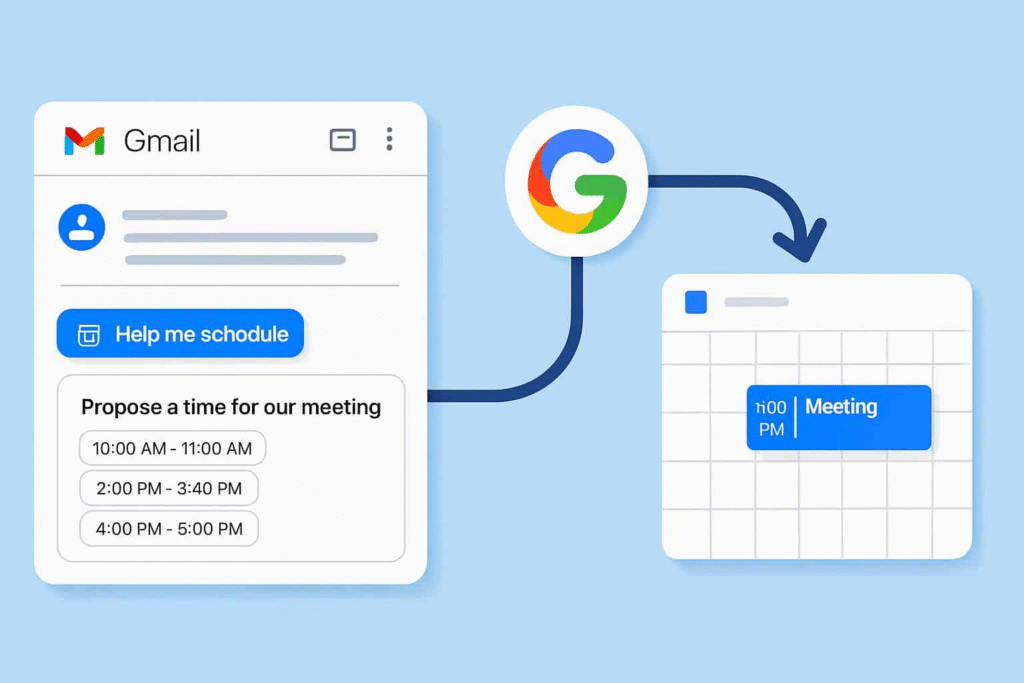
Google has added a tool that uses Gemini to help Gmail users set up meetings faster. The feature shows times when you are free and lets you insert those slots into an email. When the other person picks a time, the event lands on both calendars automatically.

Contents
  • How it works
  • Privacy and limits

This tool is aimed at one-to-one meetings. It uses the context of your message to pick suitable slots. For example, if the message asks for a thirty-minute call, the tool will offer thirty-minute options. The goal is to cut the back and forth that often comes with scheduling.
Gemini
Image Source: FindArticles

How it works

Open Gmail and start a new message. The new Help me schedule button appears below the compose window. Click that button to see suggested times from your Google Calendar. The suggestions match the length you need and your free time.

You can edit the list before you send it. Remove times that you do not want to offer. Add a note for the recipient about the best option. After you send the message, the recipient can click a time to accept. The calendar invite appears on both calendars with no extra steps.

The tool reads the email to pick times that make sense. It will look for phrases like next week or before Friday. It also checks your calendar for events and busy blocks. It will not schedule over events that are marked busy. It is a simple way to offer options and finish the meeting setup in a single exchange.

Privacy and limits

The feature runs inside Google Workspace tools. Google says the assistant uses your calendar data to make its suggestions. The suggested times are drawn from your availability only. The tool is limited to one-to-one meetings and will not handle group scheduling.
Gemini
Image Source: Gadgets 360

This addition joins other Gemini-powered tools in Workspace. Google is adding features to Slides, Docs, and other apps. The company says the new tools are meant to save time and help people work faster inside the apps they already use.

Users who prefer other scheduling services can keep using those tools. Google’s new option looks to be a quick choice for people who want to schedule from inside Gmail. It does not replace full meeting platforms for complex group planning. This update is rolling out now as part of Google Workspace changes for Gmail and Calendar. If you see the Help me schedule button, try it with a simple meeting request to see how it works.

TAGGED:AIGoogle
Share This Article
Facebook Reddit Copy Link Print
Share
Salman Akhtar
By Salman Akhtar
View enlightening tech pieces written by Salman Keep up with the most recent news, advice, and trends in the field of technology.

Let's Connect

FacebookLike
XFollow
PinterestPin
InstagramFollow
Google NewsFollow
FlipboardFollow

Popular Posts

Starzspins Deutschland: Eine umfassende Übersicht über neue Spiele und ihre Features

The Tech Basic

Cazeus Casino Chile: guía completa para comenzar a jugar en 2026

The Tech Basic

Glorion Casino België: ontdek de spannende wereld van live casino spellen

The Tech Basic

Discover the advantages of using the FunPari O’zbekiston mobile app for instant access to

The Tech Basic

You Might Also Like

Microsoft
News

Microsoft Launches Copilot Tasks Research Preview

iOS 26
How To

How iOS 26 Prioritizes Alerts With Apple Intelligence

Nvidia
News

Nvidia posts $68.1B quarter as AI boom accelerates Q4 growth

Galaxy S26
News

Samsung Reinvents AI on Galaxy S26 With Triple Assistants

Social Networks

Facebook-f Twitter Instagram Pinterest Rss

Company

  • About Us
  • Our Team
  • Contact Us

Policies

  • Disclaimer
  • Privacy Policy
  • Cookies Policy
Latest
Lenovo Teases Foldable Legion Go With 11.6 Inch Screen
Mobile Game Installs Drop but Spending Climbs in 2025
Instagram Will Tell Parents When a Teen Searches for Suicide or Self Harm
Gemini Automation Books Rides on Galaxy S26 and Pixel 10
Court Filing Probes Instagram Delay on Teen Protections

© 2024 The Tech Basic INC. 700 – 2 Park Avenue New York, NY.

TTB White LOGO TB
Follow US
Welcome Back!

Sign in to your account

Username or Email Address
Password

Lost your password?

Not a member? Sign Up





