


iMovie is a free app that helps beginners edit video on iPhone and iPad. It focuses on simple tools that let you tell a story with your clips. The app offers hands-free options and manual editing so you can choose how much work you want to do.
iMovie is best for people who want better home movies and social clips without a steep learning curve. It is not a pro tool. If you need advanced features, consider Final Cut Pro on a Mac. Still, iMovie covers most needs for short projects and social videos.

Start a Project
Open iMovie, and you will see the Projects screen. Tap Start New Project to choose one of three options. Magic Movie builds a short film automatically from the clips you pick. Storyboard gives you a template with prompts and placeholders. The movie begins with a blank timeline so you can edit by hand.
Magic Movie is quick. Select clips in the order you want them and tap Create Magic Movie. The app assembles the clips and adds music and transitions. You can reorder clips, change style, swap music, or edit any clip later. Storyboard helps when you want a themed short. It guides you on where to add a clip for each moment in the story.
A project can be renamed or shared from the Projects screen. Use Export Project to share the iMovie project bundle when you want someone else to edit the same project. Use Save or Share Video to export the finished movie as a file. You can choose the resolution and whether to export in HDR. Note that some services reduce resolution when you upload.
Edit and Export
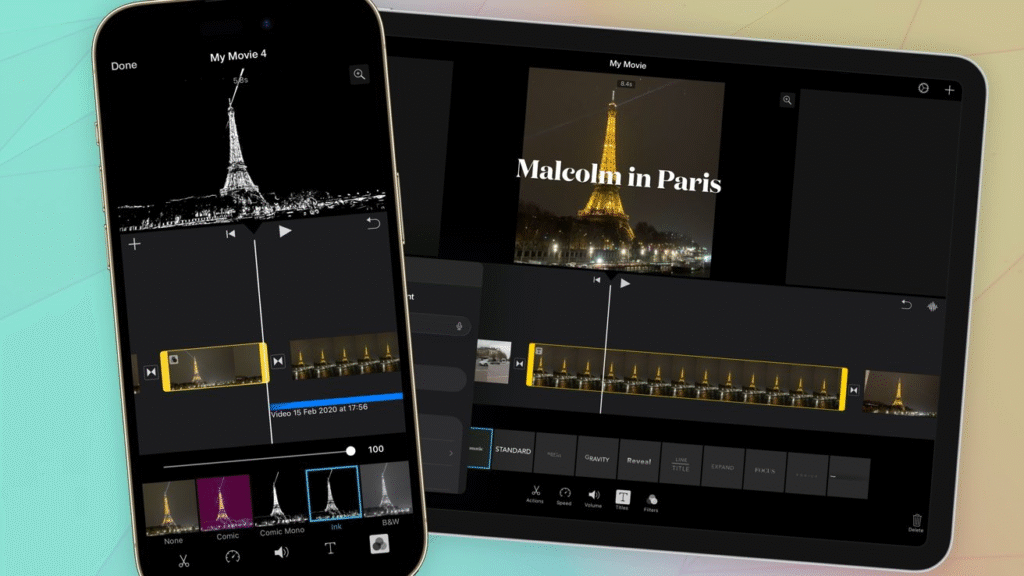
When you open a Movie project, you will see the timeline and a playhead. Tap the plus icon to add footage, images, or audio. Use pinch to zoom the timeline to make fine edits. Drag a clip to move it. Tap a clip and drag the yellow handles to trim it. These gestures help you shape timing and flow.
Editing controls appear when a clip is selected. Actions lets you split a clip, detach audio, duplicate, or delete it. Speed controls let you speed up, slow down, or freeze a frame. Volume controls adjust clip audio and allow fades. Titles add on-screen text with font and color options. Filters change the look of a single clip. Each tool is simple to use and easy to undo.
Transitions sit between clips and change how one clip moves to the next. You can pick none non-dissolve slide wipe or fade and set how long the transition lasts. The app also supplies project-wide themes and soundtracks to give a cohesive style in seconds. Use these to get a polished result fast.
Exporting is straightforward. Tap the share icon and choose Save or Share Video. Pick a resolution and decide on HDR if your device and destination support it. If you want someone else to finish the edit, choose Export Project to share the project bundle. This ensures that the clips and edits are preserved for another editor.
Practical tips for better results
Take shots with smooth hands or place on a simple tripod to inhibit movement. Keep clips short and focused on a single action or moment. Let each clip do one job in the story. Trim the start and end of clips to remove dead time. Use music to set the mood, but lower the music volume under speech. Add titles to introduce scenes or people. Export a test copy to check audio levels and image quality before sharing.
When should you move beyond iMovie
iMovie is capable of being outgrown by those who require multi-layer timelines, advanced color grading, high-end audio mixing, and/or support of any type of plugin. To work more extensively, get Final Cut Pro on Mac or the Pro app on a desktop. In several personal projects, iMovie is quick, cheap, and gets the job done.
This tutorial considers the iPhone and iPad versions of iMovie. The application has numerous similarities to the Mac version, although the touch controls are optimized to take quick edits on the fly. Use Magic Movie in case you are in a hurry. Use Movie as you wish to have complete control. Storyboard assists you in creating brief themed works one by one.







