TTB White LOGO TB
  • News
  • PC & Hardware
  • Mobiles
  • Gaming
  • Electronics
  • Gadget
  • Reviews
  • How To
  • Login
  • Sign Up
Trending
Starzspins Deutschland: Eine umfassende Übersicht über neue Spiele und ihre Features
Cazeus Casino Chile: guía completa para comenzar a jugar en 2026
Glorion Casino België: ontdek de spannende wereld van live casino spellen
Discover the advantages of using the FunPari O’zbekiston mobile app for instant access to
Rainbet Casino France : débloquez des bonus incroyables en 2026
Sunday, Aug 9, 2026
The Tech BasicThe Tech Basic
Font ResizerAa
Search
  • News
  • PC & Hardware
  • Mobiles
  • Gaming
  • Electronics
  • Gadget
  • Reviews
  • How To
Follow US
Xbox
The Tech Basic > Gaming > New Xbox UI Features: Pin Your Top 3 Games and Hide System Apps for a Cleaner Look
GamingNews

New Xbox UI Features: Pin Your Top 3 Games and Hide System Apps for a Cleaner Look

Salman Akhtar
Last updated: 17 May 2025 23:44
Salman Akhtar
Share
Image Source: Pure Xbox
SHARE

Microsoft is giving Xbox owners more control over how their home screen looks. A new update lets you pin your favorite games, hide apps you do not use, and make the layout less crowded. These changes are being tested with Xbox Insiders first and will roll out to everyone later.

Pin Your Top Three Games for Quick Access

You are now able to pin up to three games or apps at the top of your home screen. They remain onscreen whenever you play other games. Suppose you are fond of Fortnite and Minecraft, just pin them so they remain visible in your recent games.

Eden Marie, an Xbox engineer, said, “These pins stay near the front of the list as you play other things, so your favorite games are always easy to find.” This helps you jump back into your go-to games faster.
Xbox
Image Source: NewsBytes

Hide System Apps to Focus on Games

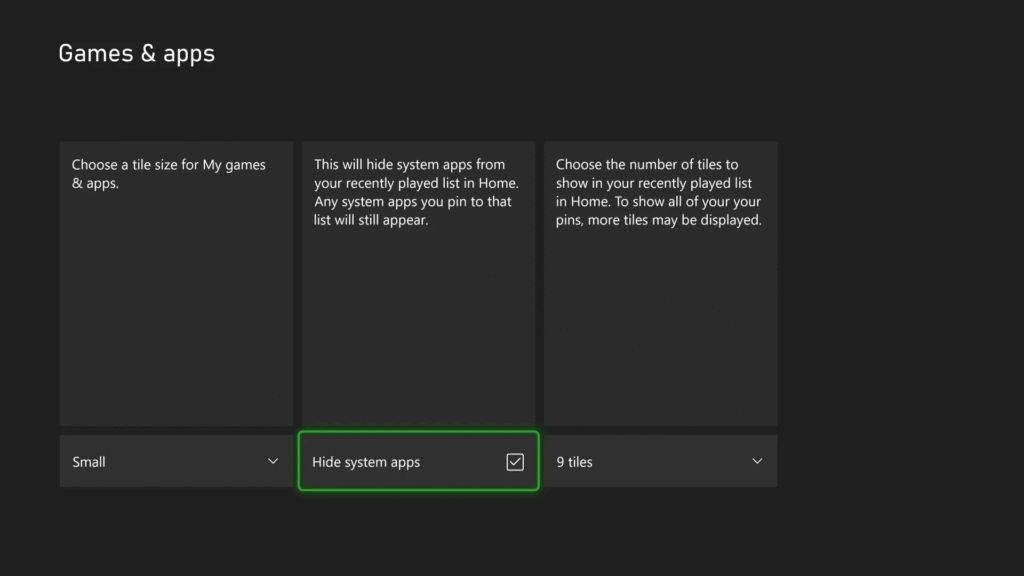
Do you get annoyed seeing apps like Netflix or Microsoft Edge on your home screen? The update lets you hide these system apps. This way, your home screen only shows games and apps you care about.

Hiding apps is simple. Go to the settings, find the app you want to hide, and toggle it off. Your screen will feel cleaner and more focused on gaming.

Make the Home Screen Less Crowded

You can make your home screen less cluttered by showing fewer tiles. Microsoft is considering showing fewer recently used games and applications. It is possible for you to display the tiles in groups of five instead of ten.

It makes the background details more visible and simplifies screen navigation. This aspect of the update is currently being fine-tuned based on Xbox Insiders’ feedback.

Why Xbox Made These Changes

Microsoft listened to players who wanted a more personal home screen. “We heard that Home should feel like your space,” said Eden Marie. Fans asked to highlight their favorite games, hide unused apps, and reduce clutter.

This update was preceded by a large home screen redesign in 2023 that made space for backgrounds and easier access to settings. Users can use the tools to personalize their Xbox to their liking.
Xbox
Image Source: XboxEra

How to Try the New Features

Xbox Insiders can currently test these updates on their devices. Access Insider Hub on your Xbox, choose to join the Alpha or Alpha Skip-Ahead group, and download the latest update. Before making these tools available to the public, Microsoft will work with feedback from users. People not part of the Insider program should expect the update around the next few months. Always check for any updates in the settings, or watch out for alerts

TAGGED:Epic GamesMicrosoftXbox
Share This Article
Facebook Reddit Copy Link Print
Share
Salman Akhtar
By Salman Akhtar
View enlightening tech pieces written by Salman Keep up with the most recent news, advice, and trends in the field of technology.

Let's Connect

FacebookLike
XFollow
PinterestPin
InstagramFollow
Google NewsFollow
FlipboardFollow

Popular Posts

Starzspins Deutschland: Eine umfassende Übersicht über neue Spiele und ihre Features

The Tech Basic

Cazeus Casino Chile: guía completa para comenzar a jugar en 2026

The Tech Basic

Glorion Casino België: ontdek de spannende wereld van live casino spellen

The Tech Basic

Discover the advantages of using the FunPari O’zbekiston mobile app for instant access to

The Tech Basic

You Might Also Like

Microsoft
News

Microsoft Launches Copilot Tasks Research Preview

Windows 11
News

Microsoft Brings Full MIDI 1.0 and 2.0 Support to Windows 11

Microsoft
News

Next Gen Power: Microsoft Turns to Superconductors

Microsoft
News

Microsoft Rushes Patch for Actively Exploited Windows Zero-Days

Social Networks

Facebook-f Twitter Instagram Pinterest Rss

Company

  • About Us
  • Our Team
  • Contact Us

Policies

  • Disclaimer
  • Privacy Policy
  • Cookies Policy
Latest
Lenovo Teases Foldable Legion Go With 11.6 Inch Screen
Mobile Game Installs Drop but Spending Climbs in 2025
Instagram Will Tell Parents When a Teen Searches for Suicide or Self Harm
Nvidia posts $68.1B quarter as AI boom accelerates Q4 growth
Samsung Reinvents AI on Galaxy S26 With Triple Assistants

© 2024 The Tech Basic INC. 700 – 2 Park Avenue New York, NY.

TTB White LOGO TB
Follow US
Welcome Back!

Sign in to your account

Username or Email Address
Password

Lost your password?

Not a member? Sign Up