The Logitech MX Keys Plus is a tool that stands out for anyone serious about typing, productivity, and comfort. Known for its sleek design and remarkable performance, the MX Keys Plus is more than just a regular keyboard. It brings together advanced functionality, wireless convenience, smart illumination, and even a palm rest that keeps you comfortable during long hours at the desk. Whether you’re a writer, a programmer, or just someone who spends a lot of time typing, this keyboard is built to elevate your experience.
- Precision and Comfort in Every Keypress
- Smart Illumination for Enhanced Productivity
- Ergonomic Palm Rest: Comfort for Long Hours
- Multi-Device Connectivity and Easy-Switch Technology
- Extended Battery Life: Less Charging, More Working
- Aesthetics and Build: Sleek, Sturdy, and Minimalist
- Conclusion: Is the Logitech MX Keys Plus Worth It?
Please follow us on Facebook and Twitter.
Precision and Comfort in Every Keypress
One of the highlights of the MX Keys Plus is its Perfect Stroke key system. Every key is designed with stability in mind, ensuring that each press feels smooth and precise. Logitech’s Perfect Stroke keys use a spherically dished design that fits the shape of your fingertips, making typing more intuitive and reducing the chance of mistypes. With a low-profile design, the keys are responsive without being too “clicky,” which makes it a quiet choice for offices or shared workspaces. It’s a typing experience that feels satisfying, fast, and, best of all, accurate.
Smart Illumination for Enhanced Productivity
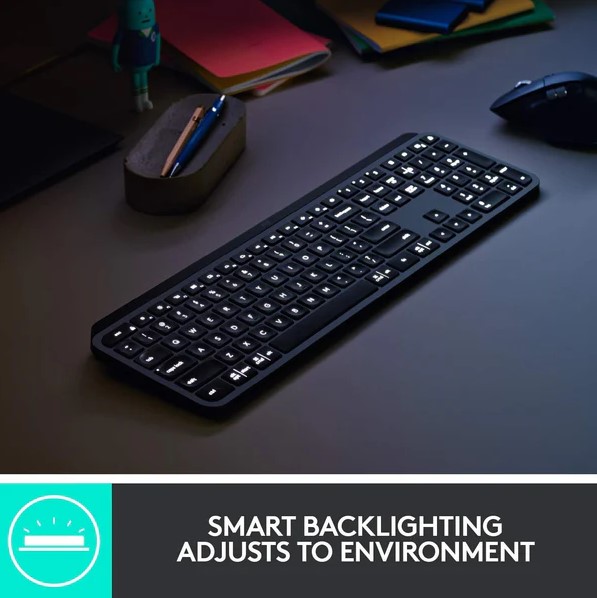
If you’ve ever struggled to find the right key in dim lighting, the MX Keys Plus has you covered. Backlit keys with proximity sensors light up as your hands approach, creating a seamless experience that adapts to your environment. When you’re done typing, the illumination fades to conserve battery. This smart illumination isn’t just a nice extra; it genuinely makes a difference for night-time productivity or working in low-light settings.
Plus, the keyboard adjusts its brightness automatically based on ambient lighting, though you can also control it manually. This feature is a small but impactful way Logitech makes sure the MX Keys Plus works with you rather than forcing you to adapt to it.
Ergonomic Palm Rest: Comfort for Long Hours
Long hours at the keyboard can take a toll on your wrists and hands, but the MX Keys Plus includes a detachable palm rest to address this issue. Made from a soft yet supportive material, the palm rest gives your wrists a comfortable surface to rest on, helping to reduce strain. The extra support is especially welcome for those working on detailed tasks or projects that require long typing sessions. Since it’s detachable, you also have the flexibility to use it only when you need it, making it adaptable to different work setups.
Multi-Device Connectivity and Easy-Switch Technology
In a world where people juggle multiple devices daily, the MX Keys Plus shines with its multi-device connectivity. You can connect it to up to three devices at once, whether they’re on Windows, macOS, Linux, iOS, or Android. With the Easy-Switch button, switching between your laptop, desktop, and tablet is effortless. This feature is perfect for those who multitask across devices, as it means you don’t need multiple keyboards or adapters on your desk.
Connecting the MX Keys Plus is also a breeze. It comes with Bluetooth and a USB receiver, so you can choose whichever option best suits your setup. This flexibility makes it easy to integrate into any workspace without fuss.
Extended Battery Life: Less Charging, More Working
Battery anxiety is real, especially with wireless devices. Logitech addresses this with the MX Keys Plus, which offers an impressive battery life of up to 10 days on a full charge with backlighting enabled. If you turn off the backlighting, you can stretch that up to five months. Charging is quick and convenient, thanks to the USB-C connection just plug it in for a short charge session and you’re back in business.
The long battery life means you won’t be interrupted during your workday by low battery alerts, and the USB-C charging means that when you need to charge, it’s a fast and universal solution.
Aesthetics and Build: Sleek, Sturdy, and Minimalist
Logitech is renowned for stylish, minimalist design, and the MX Keys Plus lives up to this legacy. The keyboard has a solid, premium feel thanks to its metal build, which keeps it sturdy and prevents it from sliding around your desk. It’s slim and compact enough to fit into almost any workspace setup, yet still offers a full-size layout with a number pad. The minimalist look doesn’t just please the eye it’s also practical, making the keyboard easy to clean and maintain.
Conclusion: Is the Logitech MX Keys Plus Worth It?
The Logitech MX Keys Plus combines style, function, and comfort in a way that few keyboards do. Its backlit, responsive keys, multi-device compatibility, and ergonomic support make it a standout choice for anyone who spends a lot of time typing. It’s an investment, yes, but for the productivity boost and comfort it offers, many will find it worth every penny. If you’re looking for a versatile, reliable keyboard that can keep up with demanding workdays, the MX Keys Plus is a fantastic choice.