

Snapchat has introduced Quick Cut, a new in-app editing workflow that turns saved photos and clips into beat-synced short videos and stylized collages. The tool is built to help casual users and creators make shareable content quickly by combining automatic beat matching with Snap’s Lens effects and royalty-free music. Quick Cut is available on iOS now, and Snap plans to expand support across Android and more surfaces soon.
Quick Cut Tools
Quick Cut centers on a simple three-step flow. First, choose a set of Memories or clips to include in a project. Next, let Quick Cut match a music track to the chosen clips and place edits to the beat. Then customize the result with Lens-driven visual effects and text before saving or sharing. The editor provides ready-made templates and auto-cropping to portrait for Stories and Spotlight formats. Users can also replace the default music with tracks from Snap’s Sounds Library and adjust timing and effects to refine the edit. The feature applies automatic beat sync, so the app times transitions to the selected music without manual keyframe work.

Quick Cut projects can include both images and video clips. The workflow supports selectable clip order and duration. Audio options include royalty-free selections that come bundled with the tool. Lens effects that usually appear in camera mode are available during editing, so creators can apply AR-style looks to remembered footage. The app also offers preset formats so users who want a fast result can publish within seconds. This makes the feature practical for people who make regular posts but do not want to move content through separate editing apps.
Creator and Brand Benefits
For creators, Quick Cut reduces the time and technical skill needed to produce a trend-aligned video. The templates and automated beat sync make it easier to align content to platform conventions without moving between multiple applications. For publishers and brands, the tool offers a way to create native Snap content that feels fresh and on trend while using the same Lens effects and music that drive organic engagement on the platform. Quick Cut also supports sharing formats optimized for Spotlight and Stories which can help creators test new ideas quickly.
Brands can use the feature to speed up campaign edits and to create more polished in-stream content. For small businesses, Quick Cut lowers the barrier to producing promotional clips that match platform aesthetics. Because the tool is embedded inside Snapchat, the final content remains native to the platform, which simplifies publishing and measurement. Snap has emphasized Lens adoption by advertisers in the pas,t and Quick Cut extends Lens accessibility into the Memories and editor experiences.
How Quick Cut Fits Snap’s Roadmap
Quick Cut continues Snap’s broader strategy of blending camera-first effects with AI-assisted creative tools. The feature complements the company’s ongoing investment in lens-based AR and in platform features that encourage repeat posting. Quick Cut also answers a common creator need by simplifying iteration and keeping the whole process inside Snapchat rather than requiring external software. This can reduce friction and encourage more frequent sharing on Snap.
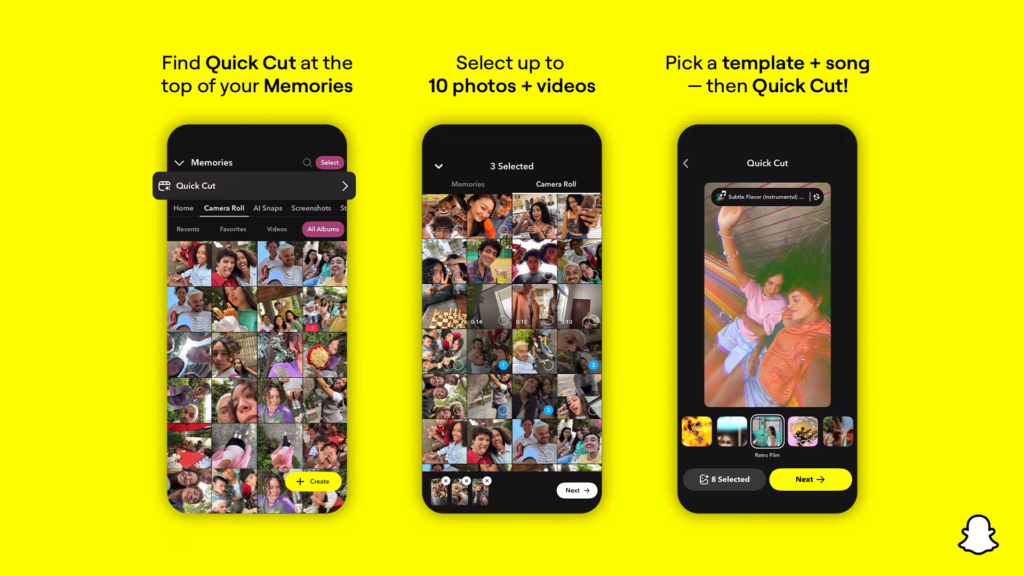
Snap is rolling out Quick Cut to iOS users first. The company has stated that Android and additional product surfaces will follow in the coming months. Snap’s pattern has been to pilot creative tools on a subset of users, then expand after the feature proves stable. Quick Cut’s integration with Memories also positions it as a way for users to repurpose archive content with minimal effort.