
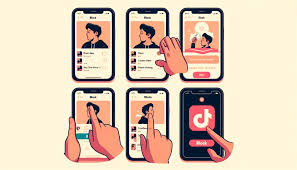

TikTok has a feature to block someone, which helps create a safe and secure environment on such an open platform. From unwanted comments, harassment, or any type of unpleasant interaction, being able to block someone on TikTok is just an easy way to handle your experience. Available on both mobile and desktop versions, the process stops blocked users from seeing your content, seeing your messages, interacting on your profile, and more.
Please follow us on Facebook and Twitter.
What Happens When You Block Someone on TikTok?
The blocked users in TikTok do not have all your posts in the feed, you cannot interact with them directly, or they cannot see your profile. As a result, they cannot comment on your videos anymore, send you a message, or like your content. No matter when they search for your username you are not going to appear in your results. Not only does this block spammy users, but it helps stop spam and nasty advertising too. It should be noted that blocked users can still show up in group chats, duets, or live streams made by other people.
How to Block Someone on TikTok (Step-by-Step)
It is easy to block an individual user. On mobile, tap the TikTok app, find the profile you wish to block, and tap the share button on the top right, then select the block option. The user is blocked but you confirm the decision. So for desktop users, it is the same thing just a few layout changes. Go to the person’s profile and click on the three horizontal dots, then choose Block from the dropdown.
However, it is important to remember first that blocking someone does not alert them that you blocked them, so you can go through and block away without worrying that you will be retaliated against or feel awkward. In addition, if a user is not just annoying but also breaking TikTok’s community guidelines, you can smother the screen to avoid being reported.
Bulk Blocking on TikTok
TikTok’s bulk block feature allows you to block 100 accounts if you are dealing with a lot of problematic users. If you are managing a big comment section and you are getting trolled or harassed, this feature is very handy. Click to comment on any video, press on a comment, and select “Manage multiple comments.” Tap More and select Block accounts. Then, those accounts will be blocked, and you won’t need to pay those accounts a visit on their profiles.
Troubleshooting: Why Can’t I Block Someone?
Users may encounter problems trying to block someone on TikTok. It would be if you could not find the block button because it changed to the ‘Share’ option in TikTok. When using the bulk block feature, remember that you can only block up to 100 users at a time. It may be a network problem, if it continues make sure that you have a good internet connection.
Viewing and Managing Blocked Accounts
All you have to do for it is head to your profile settings and look. If you are on mobile you need to tap the three lines in the upper right corner of your profile page, navigate to ‘Privacy’, and scroll down to Blocked accounts. From here, this will show you a list of all blocked users so you can always unblock anyone from that list. Keep in mind, however, that you cannot unblock multiple people at once. Unblocked users must be unblocked one at a time.
Keeping Kids Safe on TikTok
TikTok has so many entertaining videos and can distract young users a lot of time. But as a parent, you want to be aware of what your child may see. TikTok’s Parental Controls can set limits on whom your child can message or interact with, and can help ensure your child cannot see inappropriate material. They provide a safer, more enjoyable experience for your children using these tools.